Showing posts with label PHP. Show all posts

Wednesday, May 20, 2015

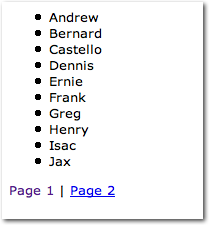
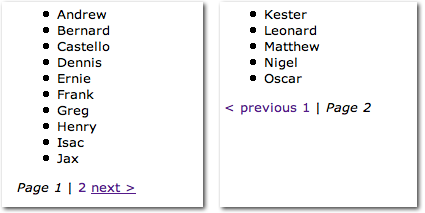
PHP: Page pagination in array

Code snippet:
$page = !empty( $_GET['page'] ) ? (int) $_GET['page'] : 1;
$total = count( $yourDataArray ); //total items in array
$limit = 10; //per page    
$totalPages = ceil( $total/ $limit ); //calculate total pages
$page = max($page, 1); //get 1 page when $_GET['page'] <= 0
$page = min($page, $totalPages); //get last page when $_GET['page'] > $totalPages
$offset = ($page - 1) * $limit;
if( $offset < 0 ) $offset = 0;

$yourDataArray = array_slice( $yourDataArray, $offset, $limit );

echo 'Pages: ';
for($i = 1; $i <= $totalPages; $i++){
 
 if($i == $page){
  echo '<b>' . $i . '</b> ';
 }elseif($i != $page){
  echo '<a href="testpage.php?page=' . $i . '">' . $i . '</a> ';
 }
 
}
Output:
Pages: 1 2 3 4 

Refer: http://stackoverflow.com/questions/26451362/how-to-add-php-pagination-in-arrays

Tuesday, May 19, 2015

PHP: Group array to unique value

Existing array:
Array
(
    [0] => Array
        (
            [id] => 12
            [name] => John
            [description] => this is a description.
        )

    [1] => Array
        (
            [id] => 57
            [name] => John
            [description] => test description.
        )

    [2] => Array
        (
            [id] => 85
            [name] => Amy
            [description] => testing 123.
        )

)
Apply this:
$result = array();

foreach ($arr as $data) {

        $name = $data['name'];
        if (isset($result[$name])) {
                $result[$name][] = $data;
        } else {
                $result[$name] = array($data);
        }

}
Output:
Array
(
        [John] => Array
        (
                [0] => Array
                (
                        [id] => 12
                        [name] => John
                        [description] => this is a description.
                )

                [1] => Array
                (
                        [id] => 57
                        [name] => John
                        [description] => test description.
                )
        )
        [Amy] => Array
        (
                [0] => Array
                (
                        [id] => 85
                        [name] => Amy
                        [description] => testing 123.
                )
        )
)

Refer: http://stackoverflow.com/questions/12706359/php-array-group

Tuesday, February 4, 2014

PHP: Get Url Components

Example 1: Code

<?php
$url = 'http://me:you@sub.site.org:29000/pear/validate.html?happy=me&sad=you#url';

$output = parse_url($url);
echo '<pre>' . print_r(parse_url($url), true) . '</pre>';
echo 'Path: '.$output['path'];
?>


Example 1: Output
Array
(
[scheme] => http
[host] => sub.site.org
[port] => 29000
[user] => me
[pass] => you
[path] => /pear/validate.html
[query] => happy=me&sad=you
[fragment] => url
)
Path: /pear/validate.html

Example 2:
To retrieve just a specific URL component as a string:
PHP_URL_SCHEME, PHP_URL_HOST, PHP_URL_PORT, PHP_URL_USER, PHP_URL_PASS, PHP_URL_PATH, PHP_URL_QUERY or PHP_URL_FRAGMENT

Code

<?php
$url = 'http://me:you@sub.site.org:29000/pear/validate.html?happy=me&sad=you#url';

echo parse_url($url, PHP_URL_PATH);
?>


Output

/pear/validate.html


Example 3: Code

<?php
function parseUrl ( $url )
{
$r = '!(?:(\w+)://)?(?:(\w+)\:(\w+)@)?([^/:]+)?';
$r .= '(?:\:(\d*))?([^#?]+)?(?:\?([^#]+))?(?:#(.+$))?!i';

preg_match ( $r, $url, $out );

return $out;
}
$output = parseUrl($url);
echo '<pre>' . print_r($output, true) . '</pre>';
echo 'Path: '.$output[6];
?>


Example 3: Output
Array
(
[0] => http://me:you@sub.site.org:29000/pear/validate.html?happy=me&sad=you#url
[1] => http
[2] => me
[3] => you
[4] => sub.site.org
[5] => 29000
[6] => /pear/validate.html
[7] => happy=me&sad=you
[8] => url
)
Path: /pear/validate.html

Example 3: Explain output

$output[0] = full url
$output[1] = scheme or '' if no scheme was found
$output[2] = username or '' if no auth username was found
$output[3] = password or '' if no auth password was found
$output[4] = domain name or '' if no domain name was found
$output[5] = port number or '' if no port number was found
$output[6] = path or '' if no path was found
$output[7] = query or '' if no query was found
$output[8] = fragment or '' if no fragment was found


Example 4: Code

<?php
$url = 'http://me:you@sub.site.org:29000/pear/validate.html?happy=me&sad=you#url';

echo 'SERVER_PROTOCOL: '.$_SERVER['SERVER_PROTOCOL'];
echo 'SERVER_NAME: '.$_SERVER['SERVER_NAME'];
echo 'SERVER_PORT: '.$_SERVER['SERVER_PORT'];
echo 'PHP_SELF: '.$_SERVER['PHP_SELF'];
echo 'REQUEST_URI: '.$_SERVER['REQUEST_URI'];
?>


Example 4: Output

SERVER_PROTOCOL: HTTP/1.1
SERVER_NAME: sub.site.org
SERVER_PORT: 29000
PHP_SELF: /pear/validate.html
REQUEST_URI: /pear/validate.html?happy=me&sad=you#url


Example 5: Code
function getcurrentpath()
{   $curPageURL = "";
    if ($_SERVER["HTTPS"] != "on")
            $curPageURL .= "http://";
     else
        $curPageURL .= "https://" ;
    if ($_SERVER["SERVER_PORT"] == "80")
        $curPageURL .= $_SERVER["SERVER_NAME"].$_SERVER["REQUEST_URI"];
     else
        $curPageURL .= $_SERVER["SERVER_NAME"].":".$_SERVER["SERVER_PORT"].$_SERVER["REQUEST_URI"];
        $count = strlen(basename($curPageURL));
        $path = substr($curPageURL,0, -$count);
    return $path ;
}
 
echo getcurrentpath();


Example 5: Output

If current URL is:
http://www.abc.com/file/demo1/contact.html

Output will be:
http://www.abc.com/file/demo1/

Refer: http://blog.vivekv.com/php-get-the-current-url-path.html

Monday, January 7, 2013

PHP: Remove intersect element(s) in array

$array1 = array('abc', 'efg', 'hij', 'klm', 'nop', 'qrs');
$array2 = array('tuv', 'abc', 'wxyz', 'qrs', 'hij');


// Find intersection
$intersection = array_intersect($array1, $array2); 

echo '<pre>'.print_r($intersection, true).'</pre>';
/* output: 
Array
(
    [0] => abc
    [2] => hij
    [5] => qrs
)
*/

// Extract
if(!empty($intersection)){

   foreach ($intersection as $key => $value) {
      unset($$array1[$key]);
   }

}

echo '<pre>'.print_r($array1, true).'</pre>';
/* output: 
Array
(
    [1] => efg
    [3] => klm
    [4] => nop
)
*/

Refer site:
Unset - http://sg2.php.net/manual/en/function.unset.php
Array intersect - http://php.net/manual/en/function.array-intersect.php

Monday, March 26, 2012

PHP: Split string using array

Example 1:
<?php
 $str = "How are you doing today?";
 $split_str = explode(" ", $str);
 echo '<pre>'.print_r($split_str, true).'</pre>'; // Output 1
 echo $split_str[1]; // Output 2
?>
Output 1
Array
(
    [0] => How
    [1] => are
    [2] => you
    [3] => doing
    [4] => today?
)
Output 2
are

Example 2:
<?php
$string = '<span style="font-weight: bold;">Lorem ipsum dolor sit amet:-</span><br>(1) consectetur adipisicing elit <br>(2) sed do eiusmod tempor <br>(3) incididunt ut labore et <br>(4) dolore magna aliqua';
echo '<p>'.$string.'</p>'; // Output 3

$chars = preg_split('/<br>/', $string, -1, PREG_SPLIT_OFFSET_CAPTURE);
$third_br_position = $chars[3][1];  
$description = substr($string, 0, $third_br_position);

echo '<p>'.$description.'</p>'; // Output 4
?>
Output 3
Lorem ipsum dolor sit amet:-
(1) consectetur adipisicing elit 
(2) sed do eiusmod tempor 
(3) incididunt ut labore et 
(4) dolore magna aliqua
Output 4
Lorem ipsum dolor sit amet:-
(1) consectetur adipisicing elit 
(2) sed do eiusmod tempor 

Refer site:
explode() - http://php.net/manual/en/function.explode.php
preg_split() - http://php.net/manual/en/function.preg-split.php
http://www.java-samples.com/showtutorial.php?tutorialid=938

Monday, January 2, 2012

Monday, December 19, 2011

PHP: Simple Pagination in MySQL I

File: booklist.php
<?php
// booklist.php?page=10
$start_page = (empty($_GET['page'])) ? '0' : $_GET['page'];

function pagination(){
 $sql = mysql_query("SELECT * FROM books ORDER BY id"); 
 $result = mysql_num_rows($sql);
 $counter = $result / 10;
 $paginate = substr($counter, 0, strpos($counter, '.'));

 for($i = 0; $i <= $paginate; $i++){
  $pages = $i * 10;
  $pg_num = $i + 1;
  echo '<a href="booklist.php?page='.$pages.'">'.$pg_num.'</a> ';
 }

 return '<br />Total: '.$result;
}

$sql = mysql_query("SELECT * FROM books ORDER BY id LIMIT $start_page, 10");

// database fields
$fields = "id,title,description,created";
$fields_array = explode(',',$fields);
 
// display
echo '<table border="1">';

echo '<tr>';
foreach($fields_array as $key=>$field){   
 echo '<th>'.$field.'</th>';  
}
echo '</tr>';
 
while($row = mysql_fetch_assoc($sql)){ 
 foreach($fields_array as $key=>$field){
  $field_name = (empty($row[$field])) ? '0' : $row[$field];
  echo '<td align="center">'.$field_name.'</td>'; 
 }
}

// pagination 
echo '<tr><td colspan="4">'.pagination().'</td></tr>';
echo '</table>';
?>

Saturday, October 29, 2011

PHP: Search URL in a string

When found an URL beginning with http://, add anchor tag to it.
 
Code:
<?php
$str = "bla http://www.example.com bla bla http://www.example.net bla bla";

$m = preg_match_all('/http:\/\/[a-z0-9A-Z.]+(?(?=[\/])(.*))/', $str, $match);

if ($m) {
 $links = $match[0];
 for ($j = 0; $j < $m; $j++) {
  $str = str_replace($links[$j],
  '<a href="'.$links[$j].'">'.$links[$j].'</a>',
  $str);
 }
}

echo "Content: ".$str; 
?>

Output:

Content: bla http://www.example.com bla bla http://www.example.net bla bla


Refer:
http://php.net/manual/en/function.preg-match-all.php
http://php.net/manual/en/function.preg-match.php

Other regex expressions to match URL format:
@((https?://)?([-\w]+\.[-\w\.]+)+\w(:\d+)?(/([-\w/_\.]*(\?\S+)?)?)*)@
Refer: http://stackoverflow.com/questions/16113652/using-phps-preg-match-all-to-extract-a-url

Thursday, October 20, 2011

PHP: Convert Long Integer to String

Sometimes long integer might automatic generate as a scientific notation/numerical format, when export to excel sheet for an example.
Eg: 725239016523 --> 7.25239E+11

To make sure all numbers are displayed, you may force the integer variable to string. There are many ways to convert it to string, below are some of the tricks, but might be more:-

<?php
$integer = 725239016523;
echo $integer . " is a ". gettype($integer) . "<br>"; // check type of $integer

$item = (string)$integer; // or
$item = strval($integer); // or
$item = trim($integer); // or
$item = $integer.""; // or
$item = $integer." "; // or
$item = $integer."&nbsp;"; // or
$item = "$integer"; // or ...

echo $item . ' is a '. gettype($item) . "<br>"; // check $integer whether is string or integer
?>


Refer: http://stackoverflow.com/questions/1035634/converting-an-integer-to-a-string-in-php

See also check type of a variable
sprintf() - Return a formatted string
gettype() - Get the type of a variable
is_bool() - Finds out whether a variable is a boolean
is_float() - Finds whether the type of a variable is float
is_int() - Find whether the type of a variable is integer
is_string() - Find whether the type of a variable is string
is_array() - Finds whether a variable is an array
is_object() - Finds whether a variable is an object
is_numeric() - Finds whether a variable is a number or a numeric string
is_scalar() - Finds whether a variable is a scalar
is_null() - Finds whether a variable is NULL
is_resource() - Finds whether a variable is a resource

Thursday, April 7, 2011

CakePHP: Create Twitter Widget

Pull feeds from Twitter and set time function: /controllers/components/twitter.php
<?php
function relativeTime($time) { 
 $SECOND = 1;
 $MINUTE = 60 * $SECOND;
 $HOUR = 60 * $MINUTE;
 $DAY = 24 * $HOUR;
 $MONTH = 30 * DAY;
 
 $delta = time() - $time; // change time to match with twitter time
 if ($delta < 2 * $MINUTE) {
  return "1 minute ago";
 }
 if ($delta < 45 * $MINUTE) {
  return floor($delta / $MINUTE) . " minutes ago";
 }
 if ($delta < 120 * $MINUTE) {
  return "about 1 hour ago";
 }
 if ($delta < 24 * $HOUR) {
  return floor($delta / $HOUR) . " hours ago";
 }
 if ($delta < 48 * $HOUR) {
  return "yesterday";
 }
 if ($delta < 30 * $DAY) {
  return floor($delta / $DAY) . " days ago";
 }
 if ($delta < 12 * $MONTH) {
  $months = floor($delta / $DAY / 30);
  return $months <= 1 ? "1 month ago" : $months . " months ago";
 } else {
  $years = floor($delta / $DAY / 365);
  return $years <= 1 ? "1 year ago" : $years . " years ago";
 }
}

function parse_cache_feed($usernames, $limit) {
 $username_for_feed = str_replace(" ", "+OR+from%3A", $usernames);
 $feed = "http://search.twitter.com/search.atom?q=from%3A".
          $username_for_feed."&rpp=".$limit;
 $usernames_for_file = str_replace(" ", "-", $usernames);

 // cache file directory
 $cache_file = TMP.'cache/views/'.$usernames_for_file.'-twitter'; 

 if (file_exists($cache_file)) {
  $last = filemtime($cache_file);
 }

 $now = time();
 $interval = 600; // ten minutes

 // check the cache file
 if ( !$last || (( $now - $last ) > $interval) ) {
  // cache file doesn't exist, or is old, so refresh it
  $cache_rss = file_get_contents($feed);
  if (!$cache_rss) {
   // we didn't get anything back from twitter
   echo "<!-- ERROR: Twitter feed was blank! Using cache file. -->";
  } else {
   // we got good results from twitter
   echo "<!-- SUCCESS: Twitter feed used to update cache file -->";
   $cache_static = fopen($cache_file, 'wb');
   fwrite($cache_static, serialize($cache_rss));
   fclose($cache_static);    
  }
  // read from the cache file
  $rss = @unserialize(file_get_contents($cache_file));
 }
 else {
  // cache file is fresh enough, so read from it
  echo "<!-- SUCCESS: Cache file was recent enough to read from -->";
  $rss = @unserialize(file_get_contents($cache_file));
 }
 // clean up and output the twitter feed
 $feed = str_replace("&", "&", $rss);
 $feed = str_replace("<", "<", $feed);
 $feed = str_replace(">", ">", $feed);
 $clean = explode("", $feed);
 $clean = str_replace(""", "'", $clean);
 $clean = str_replace("'", "'", $clean);
 $amount = count($clean) - 1;
 if ($amount) { // are there any tweets?
  for ($i = 1; $i <= $amount; $i++) {
   $entry_close = explode("", $clean[$i]);
   $clean_id_1 = explode("", $entry_close[0]);
   $clean_id = explode("", $clean_id_1[1]);
   $id = substr($clean_id[0], -17); 
   $clean_content_1 = explode("", $entry_close[0]);
   $clean_content = explode("", $clean_content_1[1]);
   $clean_name_2 = explode("", $entry_close[0]);
   $clean_name_1 = explode("(", $clean_name_2[1]);
   $clean_name = explode(")", $clean_name_1[1]);
   $clean_user = explode(" (", $clean_name_2[1]);
   $clean_lower_user = strtolower($clean_user[0]);
   $clean_uri_1 = explode("", $entry_close[0]);
   $clean_uri = explode("", $clean_uri_1[1]);
   $clean_time_1 = explode("", $entry_close[0]);
   $clean_time = explode("", $clean_time_1[1]);
   $unix_time = strtotime($clean_time[0]);
   $pretty_time = $this->relativeTime($unix_time);  

   $val[$i] = array('content'=>$clean_content[0], 
                    'date'=>$pretty_time, 
                    'id'=>$id);
   }
   return $val;
 } else { // if there aren't any tweets
  return false;
 }
}
?>
Note:
Relative Time Function
based on code from http://tinyurl.com/3cfdbrh
For use in the "Parse Twitter Feeds" code below

Parse Twitter Feeds
based on code from http://tinyurl.com/43yyzhm
and cache code from http://tinyurl.com/44kec57
and other cache code from http://tinyurl.com/re439b


Call pull feeds function: /controllers/feeds_controller.php

<?php
var $components = array('Twitter');

function get(){
$feed = $this->Twitter->parse_cache_feed('TWITTERNAME',10);
$this->set('feed', $feed);
}
?>


Auto-refresh function: /views/feeds/index.ctp
<script type="text/javascript" src="http://code.jquery.com/jquery-1.4.2.min.js">
</script>
<script language="javascript">
 $(document).ready(function (){
 $("#twitter").load("/feeds/get");
 var refreshId = setInterval(function() {
 $("#twitter").load('/feeds/get?randval='+ Math.random());
 }, 300000);
 });
</script>
<div id="twitter"></div>

Display Feeds: /views/feeds/get.ctp
<?php
for($i=1; $i<=count($feed); $i++){
 echo $feed[$i]['content'].'
';
 echo '<a href="http://twitter.com/TWITTERNAME/statuses/'.$feed[$i]
['id'].'">'.$feed[$i]['date'].'</a> · <a href="http://twitter.com
/?status=@TWITTERNAME%20&in_reply_to_status_id='.$feed[$i]['id'].'&
in_reply_to=TWITTERNAME" target="_blank">reply</a>'; 
}
?>
 

Thursday, January 6, 2011

PHP: Store XML file into an Array

Example XML file: (test.xml)

<?xml version="1.0" encoding="ISO-8859-1"?>
<note>
<to>Tove</to>
<from>Jani</from>
<heading>Reminder</heading>
<body>Don't forget me this weekend!</body>
</note>


Example PHP file:
function xml2array($xml) {
$xmlary = array();

$reels = '/<(\w+)\s*([^\/>]*)\s*(?:\/>|>(.*)<\/\s*\\1\s*>)/s';
$reattrs = '/(\w+)=(?:"|\')([^"\']*)(:?"|\')/';

preg_match_all($reels, $xml, $elements);

foreach ($elements[1] as $ie => $xx) {
$xmlary[$ie]["name"] = $elements[1][$ie];

if ($attributes = trim($elements[2][$ie])) {
preg_match_all($reattrs, $attributes, $att);
foreach ($att[1] as $ia => $xx)
$xmlary[$ie]["attributes"][$att[1][$ia]] = $att[2][$ia];
}

$cdend = strpos($elements[3][$ie], "<");
if ($cdend > 0) {
$xmlary[$ie]["text"] = substr($elements[3][$ie], 0, $cdend - 1);
}

if (preg_match($reels, $elements[3][$ie]))
$xmlary[$ie]["elements"] = xml2array($elements[3][$ie]);
else if ($elements[3][$ie]) {
$xmlary[$ie]["text"] = $elements[3][$ie];
}
}
return $xmlary;
}

$file = "test.xml";

// replace spacing to a space character
$space = strrpos($file, " ");
if ($space === false) {
// not found
}else {
$file = str_replace(" ", "%20", $file);
}

//Get the XML document loaded into a variable
$xml = file_get_contents($file);
echo '<pre>' . print_r(xml2array($xml), true) . '</pre>';
Refer ASCII code / HTML code / Hex / Special Code / Virtual Key Codes @ here.

Output:
Array
(
[0] => Array
(
[name] => note
[text] => 
[elements] => Array
(
[0] => Array
(
[name] => to
[text] => Tove
)

[1] => Array
(
[name] => from
[text] => Jani
)

[2] => Array
(
[name] => heading
[text] => Reminder
)

[3] => Array
(
[name] => body
[text] => Don't forget me this weekend!
)

)

)

)

Reference:
PHP XML 2 Array Function
XML to Array and backwards

Sunday, December 5, 2010

PHP: Export excel sheet

Export dynamic data, images etc to excel in php.

Example 1

<?php
header("Expires: 0");
header("Last-Modified: " . gmdate("D, d M Y H:i:s") . " GMT");
header("Cache-Control: no-store, no-cache, must-revalidate");
header("Cache-Control: post-check=0, pre-check=0", false);
header("Pragma: no-cache");
header("Content-type: application/vnd.ms-excel;charset:UTF-8");
header("Content-Disposition: attachment; filename=filename.xls");
print "\n"; // Add a line, unless excel error..
?>
<table border="1">
<tr>
<th>header 1</th>
<th>header 2</th>
</tr>
<tr>
<td>data 1</td>
<td><img src="photo.jpg"></td>
</tr>
</table>


Example 2

<?php
function cleanData(&$str) {
$str = preg_replace("/\t/", "\\t", $str);
$str = preg_replace("/\r?\n/", "\\n", $str);
if(strstr($str, '"')) $str = '"' . str_replace('"', '""', $str) . '"';
}

// database connection
$db = mysql_connect('localhost','root','');
mysql_select_db('Books');

// file name for download
$filename = "website_data.xls";
header("Content-Disposition: attachment; filename=\"$filename\"");
header("Content-Type: application/vnd.ms-excel");
$flag = false;
$result = mysql_query("SELECT id, name FROM users") or die('Query failed!');

echo "ID\tNAME\n";
while(false !== ($row = mysql_fetch_assoc($result))) {
if(!$flag) {
// display field/column names as first row
echo $row['id']."\t".$row['name']."\n";
$flag = true;
}
array_walk($row, 'cleanData');
echo $row['id']."\t".$row['name']."\n";
}
?>


Example 3

<?php
$filename ="excelreport.xls";
$contents = "testdata1 \t testdata2 \t testdata3 \t \n";
header('Content-type: application/ms-excel');
header('Content-Disposition: attachment; filename='.$filename);
echo $contents;
?>


http://www.gersh.no/posts/view/easy-excel-export-from-php
http://www.the-art-of-web.com/php/dataexport/
http://www.daniweb.com/forums/thread124300.html

Monday, August 16, 2010

PHP : Download uploaded file

1. file.html

<!-- 123 is the file id in db -->
<a href="download.php?id=123">Download</a>


2. connection.php

<?php

// connect to database
$dbhost = 'localhost';
$dbuser = 'root';
$dbpass = 'password';

$conn = mysql_connect($dbhost, $dbuser, $dbpass)or die('Error connecting to mysql');

$dbname = 'petstore';
mysql_select_db($dbname);
?>


3. download.php

<?php

//connect to db
include('connection.php');

// get file id from db
if(isset($_GET['id']))
{
// if id is set then get the file with the id from database
$id = $_GET['id'];
$result = mysql_query("SELECT filename, content_type, size, stored_filename FROM uploads WHERE id = '$id'") or die('Error, query failed');
list($name, $type, $size, $stored) = mysql_fetch_array($result);

$attachfile = $stored;
$file = str_replace(' ', '_', $name);
$actualsize = filesize($attachfile);
$image_data = (fread(fopen("$attachfile", "r"),filesize($attachfile)));
header("Content-Type: $ ");
header("Content-Disposition: attachment; filename = $file");
header("Content-Length: $actualsize");
echo $image_data;
fclose($attachfile);

exit;
}

?>


Thursday, August 12, 2010

PHP : Ajax : Refresh partially without refresh entire page

1. Show alert after 10 seconds with ajax setInterval function

<script type="text/javascript" src="http://ajax.googleapis.com/ajax/libs/jquery/1.3.0/jquery.min.js"></script>
<script language="JavaScript">
setInterval( "alert('Hello World')", 10000 );
</script>


2. Update your contents after 5 seconds with ajax setInterval function

<script type="text/javascript" src="http://ajax.googleapis.com/ajax/libs/jquery/1.3.0/jquery.min.js"></script>
<script language="JavaScript">
setInterval( "hello();", 5000 ); ///////// 5 seconds

$(function() {
hello = function(){
$('#dataDisplay').prepend("Hi This is auto refresh example<br><br>").fadeIn("slow");
}
});
</script>


3. Refresh div when insert database row


Ajax JQuery / PHP – Refresh Table Demo
Download Ajax JQuery / PHP – Refresh Table

Refer link:
http://www.w3cgallery.com/
http://www.brightcherry.co.uk

Tuesday, June 29, 2010

PHP: Error date() function on Joomla

Error show on Joomla:

Warning: date() [function.date]: It is not safe to rely on the system's timezone settings. You are *required* to use the date.timezone setting or the date_default_timezone_set() function. In case you used any of those methods and you are still getting this warning, you most likely misspelled the timezone identifier. We selected 'Europe/Helsinki' for 'EEST/3.0/DST' instead in /var/www/books/libraries/joomla/utilities/date.php on line 198

Warning: strtotime() [function.strtotime]: ...
Warning: mktime() [function.mktime]: ...
Warning: strftime() [function.strftime]: ...


SUMMARY
ERROR MESSAGE: date() [function.date]: It is not safe to rely on the system's timezone settings

If you receive the above error message, this is due to latest PHP5 date() function rewrite. To solve this issue, you can edit the php.ini or phplive/system.php

Solution 1: Editing the php.ini file at /usr/local/lib or /usr/local/etc
(recommended):

To solve this issue, simply edit your php.ini file and set your date.timezone value:

date.timezone = "timezone_here"


You can view supported timezone values at the List of Supported Timezones at php.net

eg: date.timezone = "America/Chicago"


** IMPORTANT: After you set the date.timezone value, you will need to restart your web server.

Solution 2: Editing the phplive/system.php file:

If you do not have access to the php.ini file, you can further edit the system.php file and add the following code at the bottom of the file:

date_default_timezone_set( "timezone_here" );


Taken From: http://www.phplivesupport.com/

PHP: Check PHP version in Linux

Step 1: Execute this command
Code:

php -v


Step 2: after you have send this command, you should see something like this:
Code:

[root@host ~]# php -v
PHP 5.0.5 (cli) (built: Apr 26 2006 09:47:41)
Copyright (c) 1997-2004 The PHP Group
Zend Engine v2.0.5, Copyright (c) 1998-2004 Zend Technologies


If you find this useful, would you like to buy me a drink? No matter more or less, it will be an encouragement for me to go further. Thanks in advance!! =)

Monday, June 21, 2010

PHP: Compare Simple UTC timestamp with Ruby on Rails

In PHP

<?
echo gmdate("Y-m-d\TH:i:s\Z", time()); //2010-06-22T03:13:05Z

echo strtotime(gmdate("Y-m-d\TH:i:s\Z", time())); //1277176425
?>


In Ruby on Rails

<%= Time.now.utc %> # Tue Jun 22 03:13:05 UTC 2010

<%= Time.now.utc.to_i %> # 1277176425


If you find this useful, would you like to buy me a drink? No matter more or less, it will be an encouragement for me to go further. Thanks in advance!! =)

Tuesday, February 23, 2010

PHP : Replace characters

Example 1: Basic str_replace() examples
<?php
// Provides: <body text='black'>
$bodytag = str_replace("%body%", "black", "");

// Provides: Hll Wrld f PHP
$vowels = array("a", "e", "i", "o", "u", "A", "E", "I", "O", "U");
$onlyconsonants = str_replace($vowels, "", "Hello World of PHP");

// Provides: You should eat pizza, beer, and ice cream every day
$phrase = "You should eat fruits, vegetables, and fiber every day.";
$healthy = array("fruits", "vegetables", "fiber");
$yummy = array("pizza", "beer", "ice cream");

$newphrase = str_replace($healthy, $yummy, $phrase);

// Provides: 2
$str = str_replace("ll", "", "good golly miss molly!", $count);
echo
$count;
?>

Example 2: Examples of potential str_replace() gotchas
<?php
// Order of replacement
$str = "Line 1\nLine 2\rLine 3\r\nLine 4\n";
$order = array("\r\n", "\n", "\r");
$replace = '
'
;

// Processes \r\n's first so they aren't converted twice.
$newstr = str_replace($order, $replace, $str);

// Outputs F because A is replaced with B, then B is replaced with C, and so on...
// Finally E is replaced with F, because of left to right replacements.
$search = array('A', 'B', 'C', 'D', 'E');
$replace = array('B', 'C', 'D', 'E', 'F');
$subject = 'A';
echo
str_replace($search, $replace, $subject);

// Outputs: apearpearle pear
// For the same reason mentioned above
$letters = array('a', 'p');
$fruit = array('apple', 'pear');
$text = 'a p';
$output = str_replace($letters, $fruit, $text);
echo
$output;
?>